From the customer's call to the paid invoice. Six steps.
MulchDeck replaces the legal pad, the spreadsheet, and the guessing. Pull the lot, price it from your rate card, send the quote, log the job, invoice it, and know whether you made money. It all works offline. The trial starts the same way: type an address, and the lot, the acres, and a price come up before setup is done.
14-day free trial. No credit card.
01Address
Type the address. Check the lot.
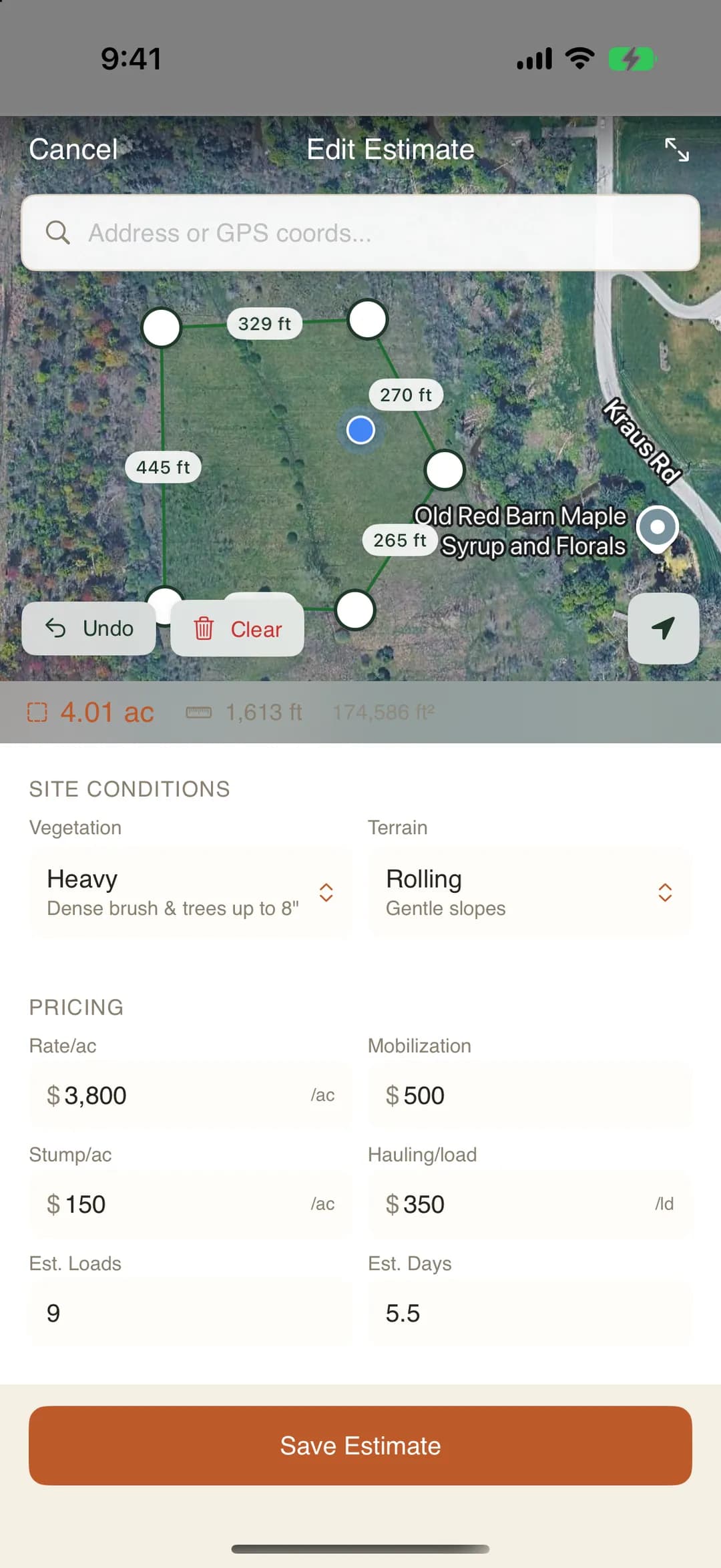
A customer calls about clearing 12 acres off a county road. You type the address and the parcel outline from county records lands on the satellite map.
The old way: Drive out with a measuring wheel, or eyeball the acres off a plat book.
Trim the outline to the part you are clearing, or draw the polygon yourself. It can follow the parcel line on one side and cut across at the tree line on the other. The acreage is measured from the shape and updates as you move a point.
If the first lot is the wrong one, pick the right one from the lots nearby. If the county has no outline, draw it.
- Imagery
- Google satellite at every zoom
- Parcel
- Outline from county records, from the address
- Acreage
- Measured from the polygon, not guessed
- Runs on
- Phone, tablet, or desktop
02Price
Tag the conditions. The rate card prices it.
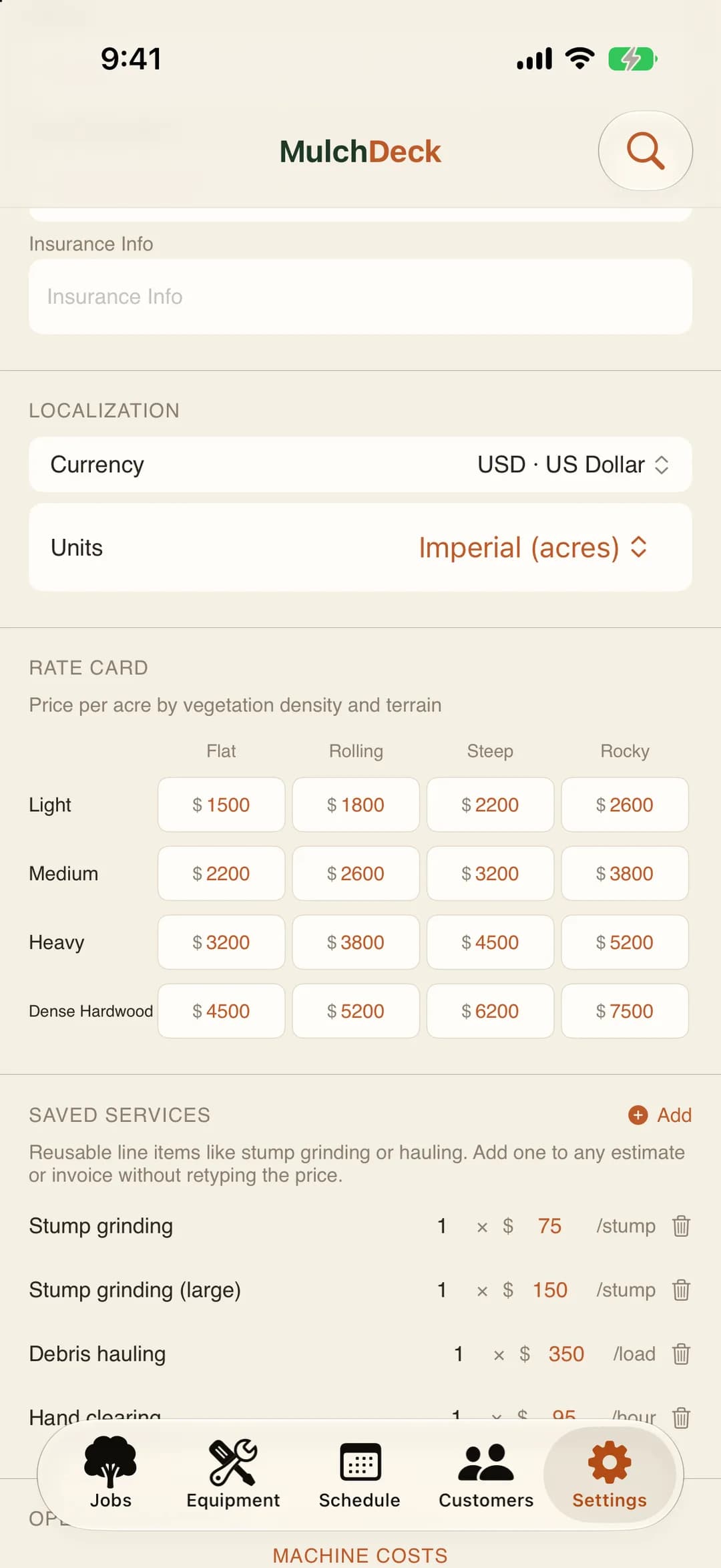
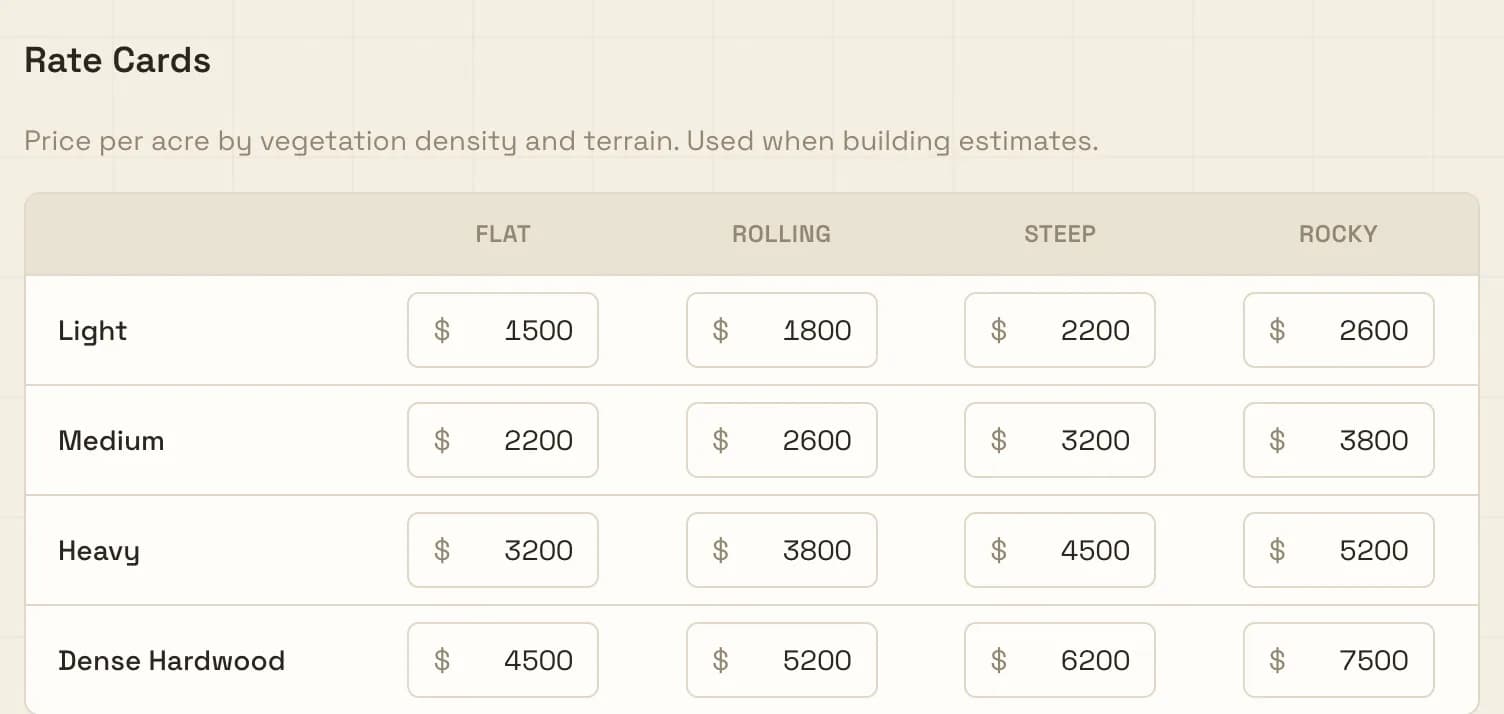
Two things drive the price of a clearing job: how thick it is and what the ground is like. Four levels of each makes 16 prices, and you set them once.
The old way: Work the price out on a calculator in the truck and hope it matches the last one.
Density is light brush, medium, heavy, or dense hardwood. Terrain is flat, rolling, steep, or rocky. Tag the polygon “heavy on rolling ground” and your per-acre price for that combination fills in. Multiply by the acres. Done.
Mobilization, stump treatment, and hauling go on as their own lines. Still dialing in your numbers? The land clearing cost calculator is free.
- Rate card
- 16 per-acre prices, density x terrain
- Add-ons
- Mobilization, stumps, hauling, or your own lines
- Same numbers
- Whoever on the crew builds the estimate
03Quote
Send the quote before you leave the driveway.
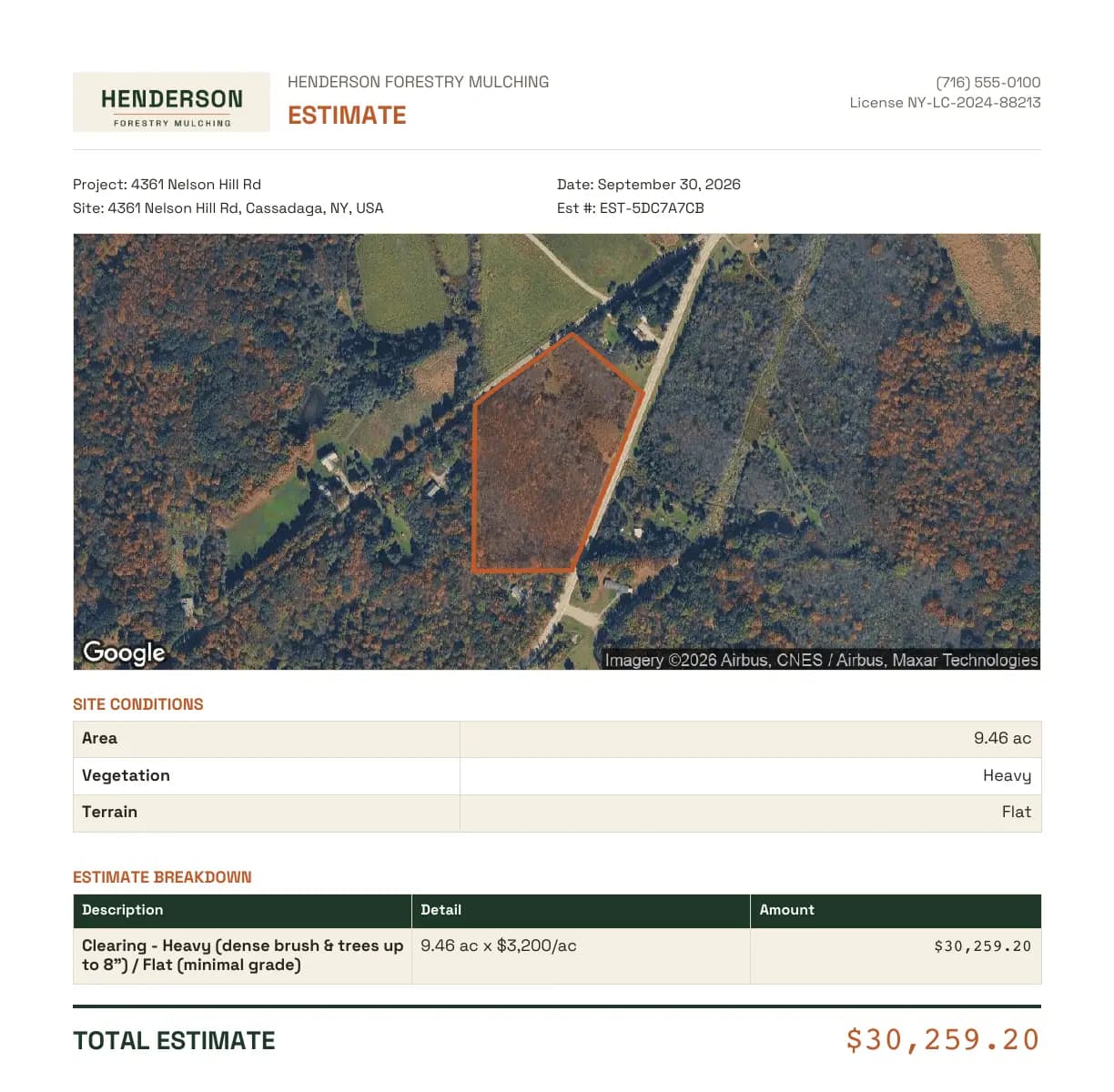
One tap builds the PDF from the estimate. The customer gets their own property from above with the outline you priced, your logo at the top, and every line they pay for.
The old way: A paragraph in a text message, or a Word doc typed up that night.
- Letterhead
- Your logo, business name, phone, and license number
- The lot
- Satellite picture with the parcel outline drawn on it
- The numbers
- Acres, vegetation, terrain, each line item, and the total
- Sending
- Share it from your phone, or download it on the web
It comes out the same on iPhone, Android, and the web. Lines that come to $0 are left off. Customers pay you directly. MulchDeck never touches the money.
Try steps one to three on your next call.
14-day free trial. No credit card.
04Run the job
Run the job day by day. Even with no signal.
Everybody knows where to be, the hours and fuel get written down the day they happen, and the gate code is on every phone.
The old way: A whiteboard at the shop and a timesheet on the dash that never makes it back.
The day board shows who is on which job today and who has not been put anywhere yet. The week roster fills Monday to Sunday in one save. Day laborers and subs with no login go on by name, and a weekday morning email tells each person where they are.
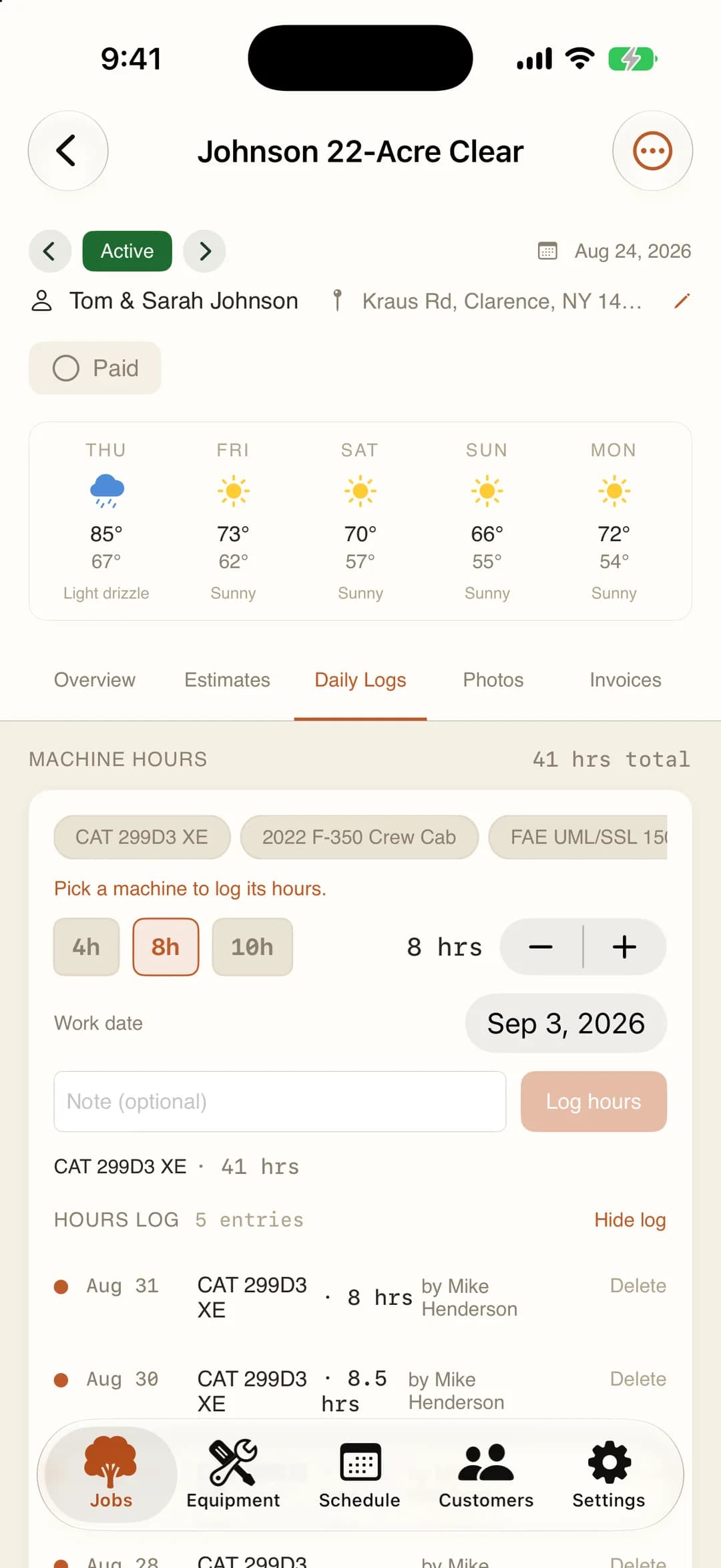
When the mulcher shows up, the daily log takes machine hours, fuel gallons, and teeth replaced. Hours are logged per person per day, so a three-person day counts three people. Before and after photos attach to the job with GPS coordinates and a timestamp.
Every job also has one notepad the crew shares: the gate code, the site contact, what to tell the next shift. Two people can type in it at once without overwriting each other.
With no signal, all of it saves on the phone and uploads when you are back in range. As the job runs, costs so far show next to the estimate, so being over on fuel on day three is news on day three.
05Invoice
Invoice from what you already captured.
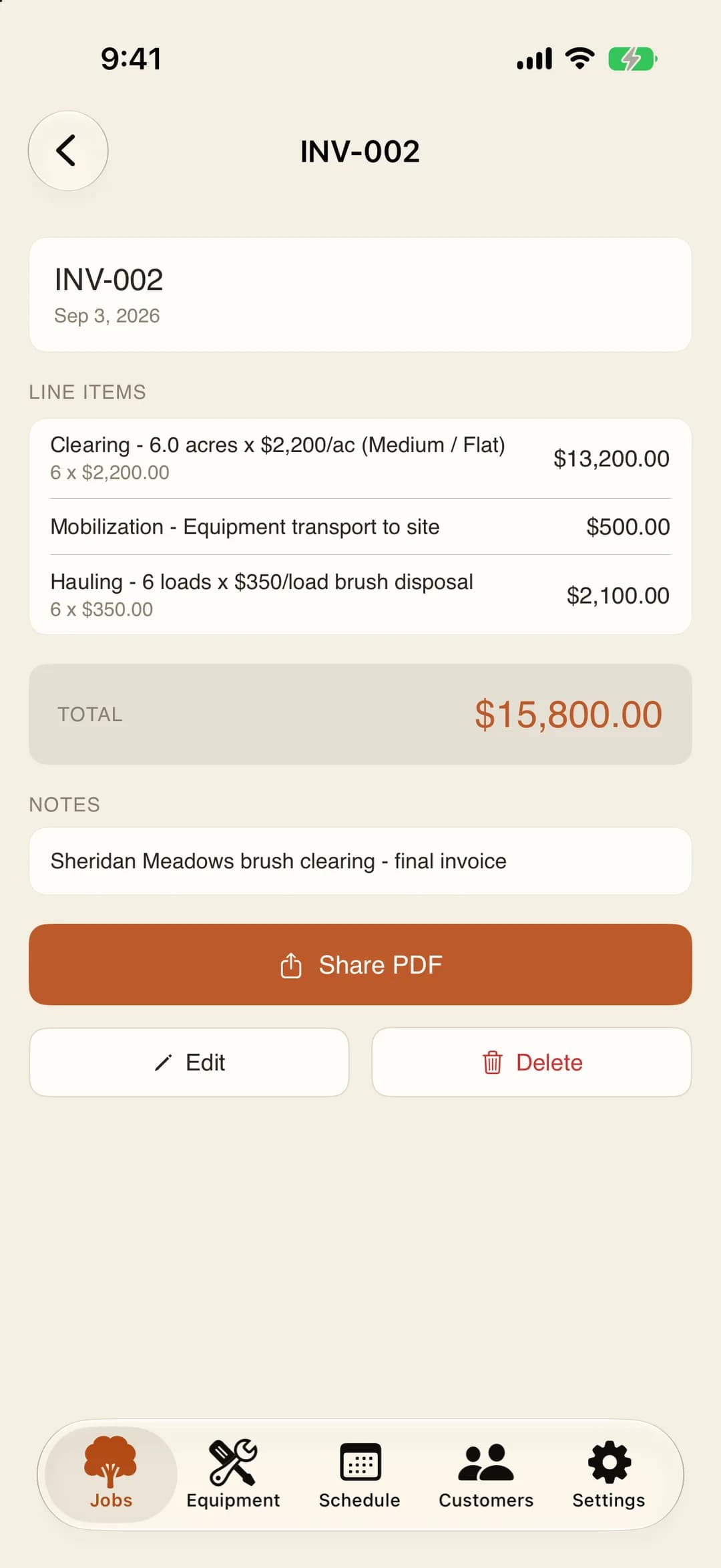
When the job wraps, the invoice starts from the estimate's line items. Scope changed? It always does.
The old way: Retyping the quote into an invoice at the kitchen table.
Add the extra day, the stump grinding you threw in, the hauling run that was not in the quote. Remove what you did not end up doing. Export the PDF with your logo and the before and after photos, and send it.
When the check clears, mark the job paid. No separate invoicing app, and no retyping line items into QuickBooks just to make a document.
- Line items
- Pulled from the estimate
- Before sending
- Edit, add, or remove lines
- The PDF
- Your logo, the lines, the photos
- Paid
- One switch on the job when the check clears
06Margin
See whether you made money.
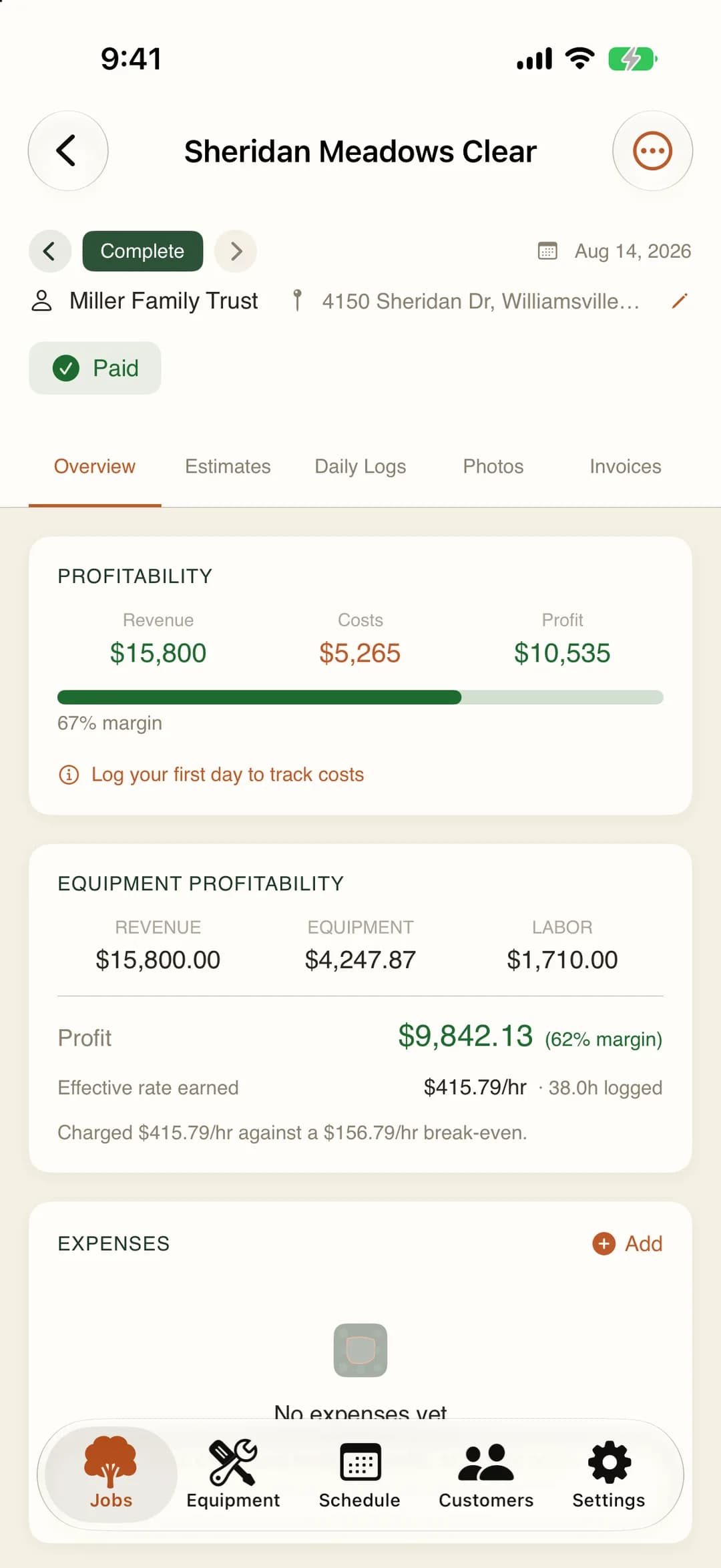
What you quoted on one side, what the job cost on the other. Green or red, per job.
The old way: The check cleared, but so did the diesel and the teeth. Nobody knows if it paid.
MulchDeck takes what was logged during the job and compares it to the estimate you priced before it started. Labor comes from the person-hours your crew logged. Machine ownership comes from depreciation, interest, and maintenance per hour on that machine. Fuel and teeth come from the daily logs. Where a rate is assumed rather than one you set, the screen says so.
Over a season, that tells you which prices on the rate card to raise. Use the profit margin calculator to model a price before you commit, then let the real job tell you how close you were.
Frequently asked questions
How long does it take to create an estimate in MulchDeck?
For a lot the parcel lookup finds, you type the address, check the outline, and tag density and terrain. The rate card does the math. Mobilization, stump treatment, and hauling are one line each. No spreadsheet.
Does MulchDeck work offline in the field?
Yes. Estimates, daily logs, photos, and invoices all save on the phone and sync when you get signal. Built for rural acreage where cell coverage is unreliable.
What is a rate card?
A grid of 16 per-acre prices: 4 vegetation densities (light brush, medium, heavy, dense hardwood) times 4 terrain types (flat, rolling, steep, rocky). Set it once and every estimate uses your numbers.
Can I customize the line items on a quote?
Yes. Beyond the rate-card acreage line, you can add custom line items for mobilization, stump treatment, hauling, debris removal, or anything else your job requires.
Replace the spreadsheets. Know your numbers.
$149/month flat. Unlimited users. 14-day free trial, no credit card. Works on the web, iPhone, and Android.
Pricing and the slow-season pause →