Features

What MulchDeck does.

Bid the job from the real parcel lines, then run it. Not a horizontal tool forced to fit. Parcel boundaries on satellite, rate card pricing, branded PDF quotes, daily logs, and profit per acre.

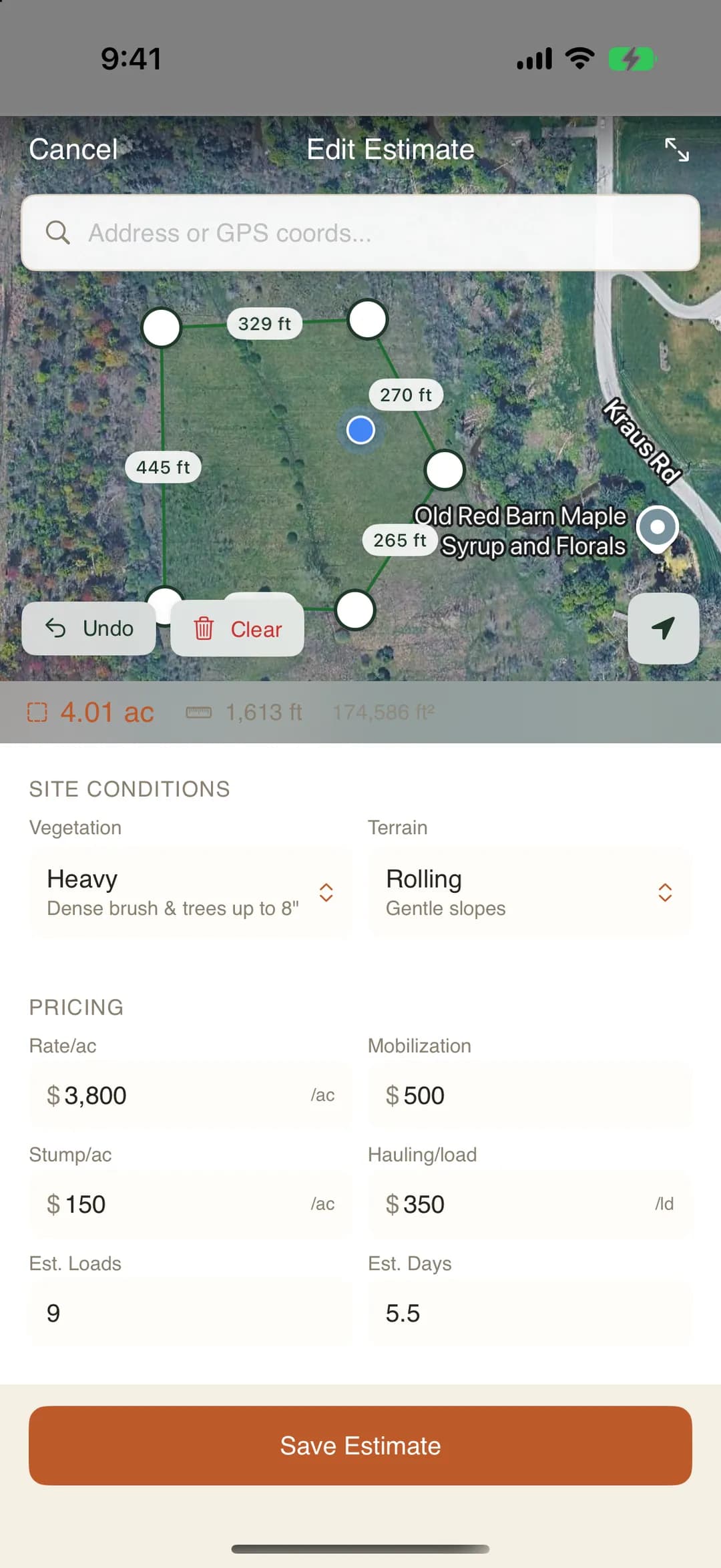
MulchDeck estimate: a work area drawn on a satellite map with acreage and per-acre pricing
MulchDeck day board showing who is on each job today, with one job still unstaffed
MulchDeck daily logs tracking hours, fuel and teeth per day
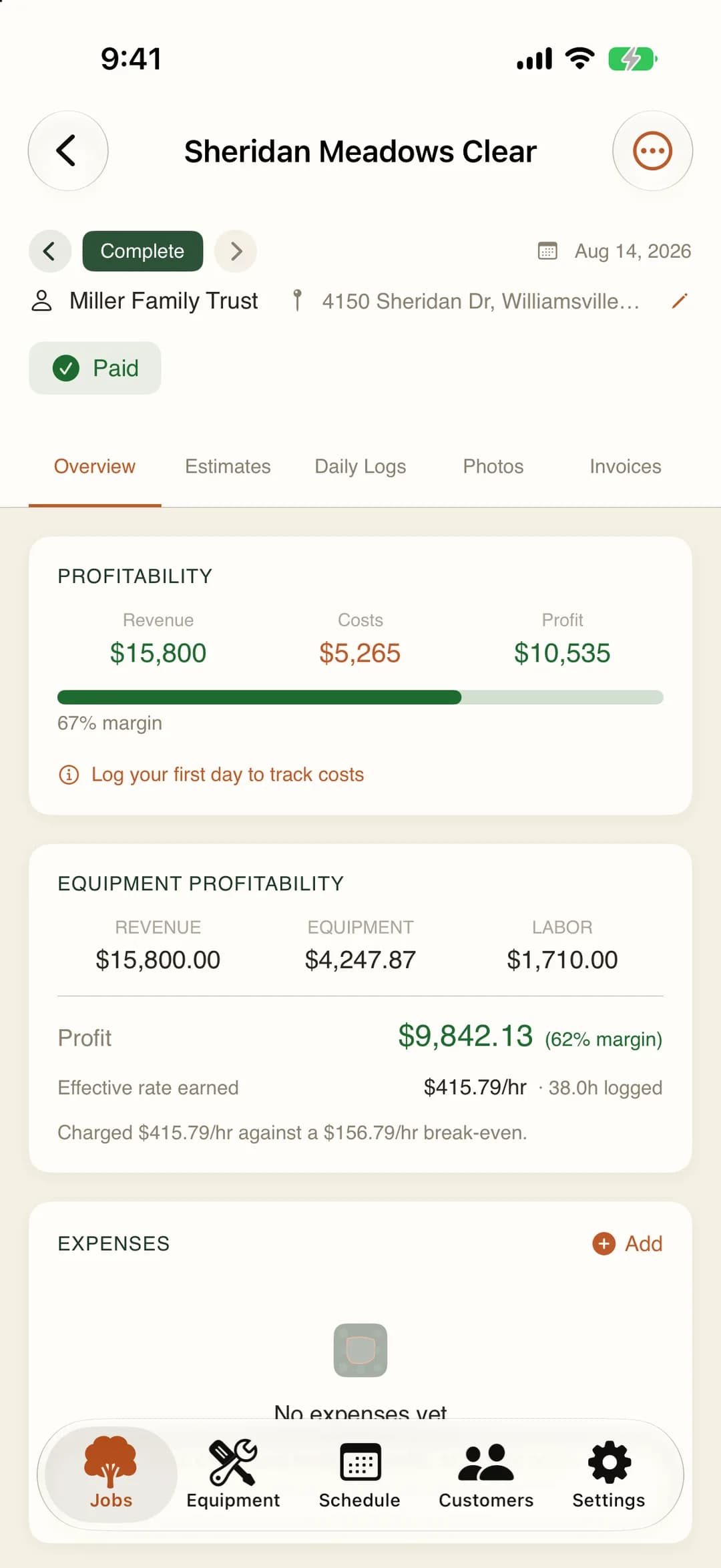
MulchDeck job profitability showing revenue, cost, profit and margin

Parcels

Parcel boundary data

US parcel boundaries load on the map automatically. See property lines, lot size, and ownership data without switching to the county GIS site.

  • Automatic parcel overlay
  • Lot size and dimensions
  • Ownership info where available
  • No manual boundary tracing

Estimating

Satellite map estimating

Search an address. Draw a polygon on the satellite image. MulchDeck calculates the acreage and applies your rate card. The estimate is ready before you leave the truck.

  • Google satellite imagery
  • Polygon acreage calculation
  • Rate card auto-pricing
  • PDF export with map embed

Pricing

Rate card pricing (16 prices)

4 vegetation densities times 4 terrain types. Set your per-acre price for each combination once. Every estimate uses the same numbers.

  • Light, moderate, heavy, very heavy
  • Flat, rolling, steep, very steep
  • Per-acre pricing
  • Consistent across all jobs

Quotes

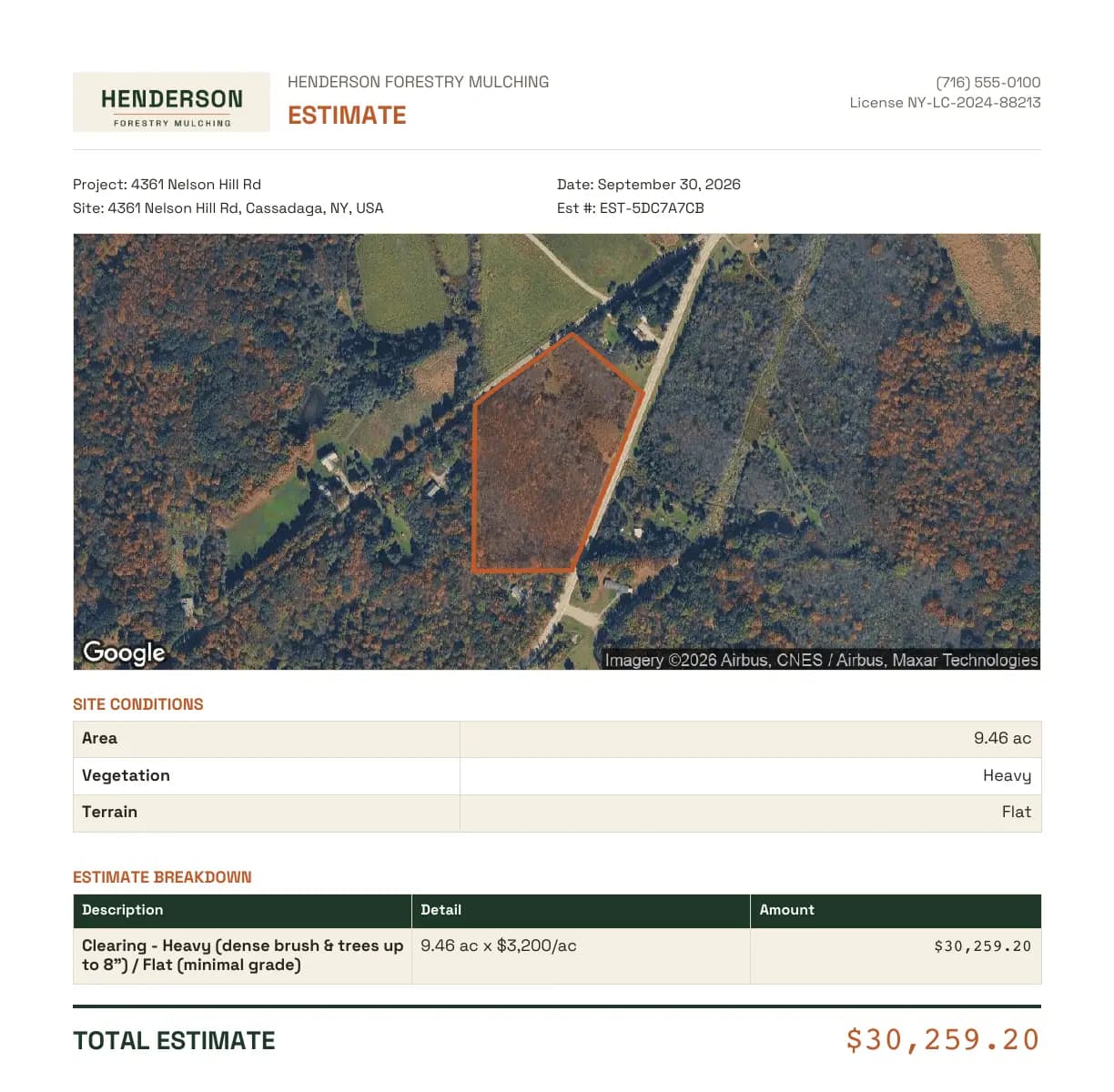
Branded PDF quotes from the field

One tap builds the quote: your business name, the satellite map with the parcel outline, the acreage, the line items, and the total. Email it or hand it over before you leave the property. Customers pay you directly. MulchDeck never touches the money, 0% of your revenue.

  • Satellite map and parcel outline embedded
  • Line items from the rate card
  • Email or share from the app
  • No platform fee on what you collect

Weather

Weather data on every estimate

Historical conditions and forecasts load automatically when you create an estimate. Know ground moisture, rain windows, and seasonal patterns before you commit to a start date.

  • Historical weather for the parcel
  • Forecast for scheduled job dates
  • Ground condition awareness
  • Rain delay risk assessment

Tracking

Job tracking

Each job has a daily log. Record hours, fuel, and teeth used per day. See the running total without rebuilding a spreadsheet.

  • Hours worked per day
  • Fuel gallons per day
  • Teeth used per day
  • Running cost vs estimate

Schedule

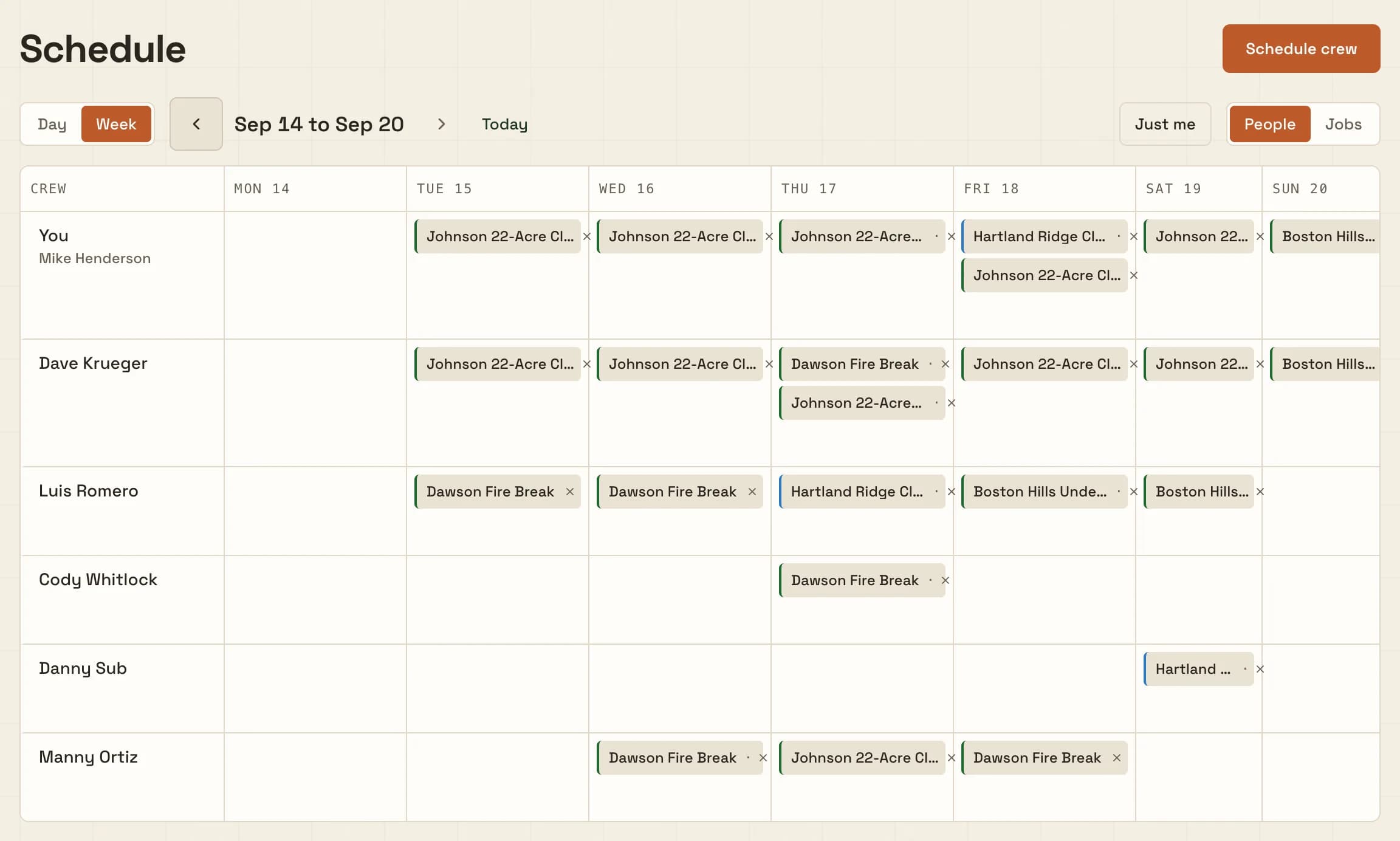
Who is on which job, by the day

The day board shows who is on every active job today and who has not been put anywhere yet. The week roster puts your people down the side and Monday to Sunday across the top. Put somebody on a job for one day or for the whole week in one save. Day laborers and subbed operators who have no account go on the board by name.

  • Day board and week roster
  • Hands with no account go on by name
  • One person can be on two jobs a day
  • Crew see their days in the morning email

Labor

Hours by person, not by machine

One entry per person per job per work day. The paper timesheet off the dash, typed once. Crew log their own hours; owners log for anyone, including the day hand who has no account and goes in by name. Those hours are what the Labor line on job profitability is built from, so a three-person day costs three people instead of one machine.

  • One entry per person per job per day
  • Day laborers logged by name
  • Feeds the Labor line on profitability
  • Owner CSV export for any date range

Notepad

One notepad the whole crew shares

Gate codes, site contacts, what to tell the next shift. Every job has one page that says what is true right now, and everyone on the crew has it on their phone. Two people can type in it at once without overwriting each other, and it keeps working with no signal.

  • Edits merge instead of clobbering
  • Works offline, syncs on reconnect
  • Phone numbers and addresses become taps
  • History you can roll back to

Photos

Before/after photos

Take photos from the app. They attach to the job with GPS coordinates and timestamps. Export a branded PDF with before and after shots for the customer.

  • GPS-tagged automatically
  • Attached to the job record
  • Before/after comparison
  • Branded PDF export

Invoicing

Invoicing from estimates

Generate an invoice from the estimate line items. Add or remove lines. Export a PDF with your business name and totals. No copy-pasting into Word.

  • Line items from estimate
  • Editable before sending
  • PDF export
  • Professional layout

Profitability

Profitability per job

MulchDeck compares what you quoted to what the job actually cost. Labor comes off the hours your people logged. Machine time is priced per hour from the depreciation, interest, and maintenance on that specific machine. Fuel and teeth come off the daily logs, insurance off your company rate. Every dollar is counted once, and if a number is resting on an assumed rate the screen says so.

  • Estimated vs actual cost
  • Labor from real person-hours
  • Machine ownership priced per hour
  • Assumed rates labeled, never hidden

Offline

Offline sync

Works on rural acreage with no cell signal. Estimates, logs, photos, and invoices save locally. Everything syncs when you get back in range.

  • Full offline support
  • Local-first data
  • Background sync
  • No data loss

Free tools

16 free calculators

Land clearing cost, crew day rate, mulching estimator, stump grinding, defensible space, machine cost, mobilization fee, lot clearing, and mulching vs bulldozing comparison. No signup required.

  • No email gate
  • No watermark
  • PDF export on every tool
  • Built for contractors and homeowners

Frequently asked questions

Does MulchDeck work without cell signal?

Yes. MulchDeck works offline. Estimates, job logs, photos, and invoices save locally and sync when you get signal back. Built for rural acreage where cell coverage is spotty.

Can I track teeth and fuel by job?

Yes. Each job has a daily log where you record hours, fuel gallons, and teeth used. MulchDeck uses that to calculate your actual cost per acre and compare it to your estimate.

Can I log hours for a day laborer who has no account?

Yes. Type the name and the hours go against that person for that job and that day. They never need an invite or a login, and there is no employee list to keep current. Owners can log for anyone; crew log their own. The same names work on the crew schedule, so the person you put on the board Tuesday is the person you log Wednesday.

Is the crew schedule an hourly dispatch calendar?

No. It is a day board and a week roster: a person is on a job for a day, or they are not. No start times, no time slots, no online booking, no route optimization, no month view. Crew members get a weekday morning email of the jobs they are on. See the crew scheduling page for the full picture of what it does and does not do.

How does the satellite estimating work?

Search an address, draw a polygon on the satellite map, and MulchDeck calculates the acreage. Pick your density and terrain, and it applies your rate card to produce a line-item estimate.

What is the rate card?

A grid of 16 prices: 4 vegetation densities (light, moderate, heavy, very heavy) times 4 terrain types (flat, rolling, steep, very steep). You set each price once and every estimate uses it.

Can I send a branded quote to a customer?

Yes. MulchDeck generates a PDF with your business name, the satellite map, parcel polygon, acreage, line items, and total. Email it or hand it to the customer.

How much does MulchDeck cost?

$149/month flat. Unlimited users. No per-seat fees. 14-day free trial, no credit card required. Cancel anytime.

Are the free calculators really free?

Yes. Sixteen calculators with no signup, no email gate, no watermark. Land clearing cost, crew day rate, machine cost, equipment break-even, stump grinding, mobilization fee, and more.

What does MulchDeck NOT do?

MulchDeck does not do payroll, CRM, online booking, or payment processing. Customers pay you directly. Scheduling is by the day: a day board, a week roster, and a weekday morning email of who is on what. There are no time slots, no route optimization, and no month calendar. It handles bidding, job tracking, and invoicing for forestry mulching. Keep QuickBooks for accounting.
Pricing

$149/month flat. Unlimited users.

14-day free trial. No credit card. Your owner, operators, office staff, and anyone else who touches a job are included.

Start free trial